| Market | Symbol |
|---|---|
| HK Market | Securities (including equities, ETFs, Warrants, CBBCs) |
| Hang Seng Index | |
| US Market | Securities (including stocks, ETFs) |
| Nasdsaq Index | |
| OPRA Options | |
| CN Market | Securities (including stocks, ETFs) |
| Index |
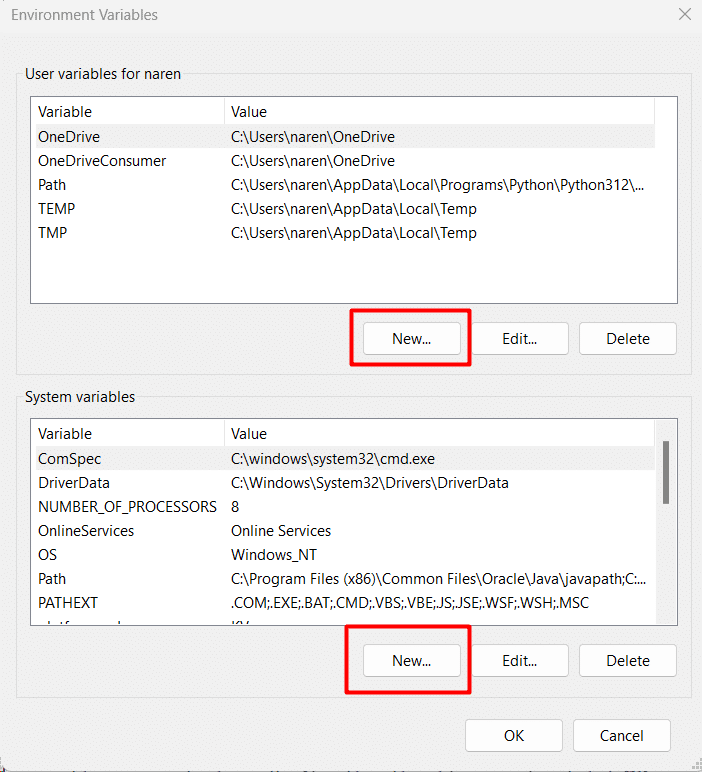 - Click "New" in the pop-up window, then enter the environment variable name, such as `LONGPORT_APP_KEY`, `Value` respectively fill in the App Key, App Secret, Access Token, Region obtained from the page.
2. **Through the CMD**: Press the `Win + R` shortcut keys and enter the `cmd` command to start the command line (it is recommended to use [Windows Terminal](https://apps.microsoft.com/store/detail/windows-terminal/9N0DX20HK701) for a better development experience).
Enter the following command in the command line to set the environment variable:
```bash
C:\Users\jason> setx LONGPORT_APP_KEY "App Key get from user center"
Success: the specified value has been saved.
C:\Users\jason> setx LONGPORT_APP_SECRET "App Secret get from user center"
Success: the specified value has been saved.
C:\Users\jason> setx LONGPORT_ACCESS_TOKEN "Access Token get from user center"
Success: the specified value has been saved.
```
:::caution Windows ENV Restrictions
Windows ENV Restrictions, when the above commands are executed successfully, you need to restart Windows or log out and log in again before you can read it.
:::
After logging out or restarting, open the command line again and enter the following command to verify that the environment variables are set correctly:
```bash
C:\Users\jason> set LONGPORT
LONGPORT_APP_KEY=xxxxxxx
LONGPORT_APP_SECRET=xxxxxx
LONGPORT_ACCESS_TOKEN=xxxxxxx
```
If it prints the value you just set correctly, then the environment variable is right.
## Scene Demonstration
### Get Account Balance
- Click "New" in the pop-up window, then enter the environment variable name, such as `LONGPORT_APP_KEY`, `Value` respectively fill in the App Key, App Secret, Access Token, Region obtained from the page.
2. **Through the CMD**: Press the `Win + R` shortcut keys and enter the `cmd` command to start the command line (it is recommended to use [Windows Terminal](https://apps.microsoft.com/store/detail/windows-terminal/9N0DX20HK701) for a better development experience).
Enter the following command in the command line to set the environment variable:
```bash
C:\Users\jason> setx LONGPORT_APP_KEY "App Key get from user center"
Success: the specified value has been saved.
C:\Users\jason> setx LONGPORT_APP_SECRET "App Secret get from user center"
Success: the specified value has been saved.
C:\Users\jason> setx LONGPORT_ACCESS_TOKEN "Access Token get from user center"
Success: the specified value has been saved.
```
:::caution Windows ENV Restrictions
Windows ENV Restrictions, when the above commands are executed successfully, you need to restart Windows or log out and log in again before you can read it.
:::
After logging out or restarting, open the command line again and enter the following command to verify that the environment variables are set correctly:
```bash
C:\Users\jason> set LONGPORT
LONGPORT_APP_KEY=xxxxxxx
LONGPORT_APP_SECRET=xxxxxx
LONGPORT_ACCESS_TOKEN=xxxxxxx
```
If it prints the value you just set correctly, then the environment variable is right.
## Scene Demonstration
### Get Account Balance
| HTTP Method | GET |
| HTTP URL | /v1/quote/get_security_list |
| HTTP Method | POST |
| HTTP URL | /v1/watchlist/groups |
| HTTP Method | DELETE |
| HTTP URL | /v1/watchlist/groups |
| HTTP Method | PUT |
| HTTP URL | /v1/watchlist/groups |
| HTTP Method | GET |
| HTTP URL | /v1/watchlist/groups |
| HTTP Method | GET |
| HTTP URL | /v1/quote/market_temperature |
| HTTP Method | GET |
| HTTP URL | /v1/quote/history_market_temperature |
| User Type | The maximum number of targets that can be queried per month |
|---|---|
| User account opening | |
| Total assets reach HKD 10,000 | |
| Total assets reach HKD 80,000 | |
| Total assets reach 400,000 HKD or the number of transactions per month is greater than 160 | |
| Total assets reach 4 million HKD or the number of transactions per month is greater than 1,600 | |
| Total assets reach 6 million HKD or the number of transactions per month is greater than 2,500 |
| HTTP Method | GET |
| HTTP URL | /v1/trade/execution/today |
| HTTP Method | GET |
| HTTP URL | /v1/trade/execution/history |
| HTTP Method | GET |
| HTTP URL | /v1/asset/account |
| HTTP Method | GET |
| HTTP URL | /v1/asset/stock |
| HTTP Method | GET |
| HTTP URL | /v1/asset/fund |
| HTTP Method | GET |
| HTTP URL | /v1/risk/margin-ratio |
| HTTP Method | GET |
| HTTP URL | /v1/asset/cashflow |
| HTTP Method | DELETE |
| HTTP URL | /v1/trade/order |
| HTTP Method | GET |
| HTTP URL | /v1/trade/order/history |
| HTTP Method | POST |
| HTTP URL | /v1/trade/order |
| HTTP Method | GET |
| HTTP URL | /v1/trade/estimate/buy_limit |
| HTTP Method | GET |
| HTTP URL | /v1/trade/order/today |
| HTTP Method | PUT |
| HTTP URL | /v1/trade/order |
| HTTP Method | GET |
| HTTP URL | /v1/trade/order |
| Market | Symbol | Ticker | Region |
| HK Market | Securities (including equities, ETFs, Warrants, CBBCs) | The official code of the security on the exchange | HK |
| Hang Seng Index | HSI | HK | |
| Hang Seng China Enterprises Index | HSCEI | HK | |
| Hang Seng TECH Index | HSTECH | HK | |
| US Market | Securities (including stocks, ETFs) | The official code of the security on the exchange | US |
| Nasdsaq Index | .IXIC | US | |
| Dow Jones Industrial Average | .DJI | US | |
| CN Market | Securities (including stocks, ETFs) | The official code of the security on the exchange | SH or SZ |
| Index | The official code of the security on the exchange | SH or SZ |
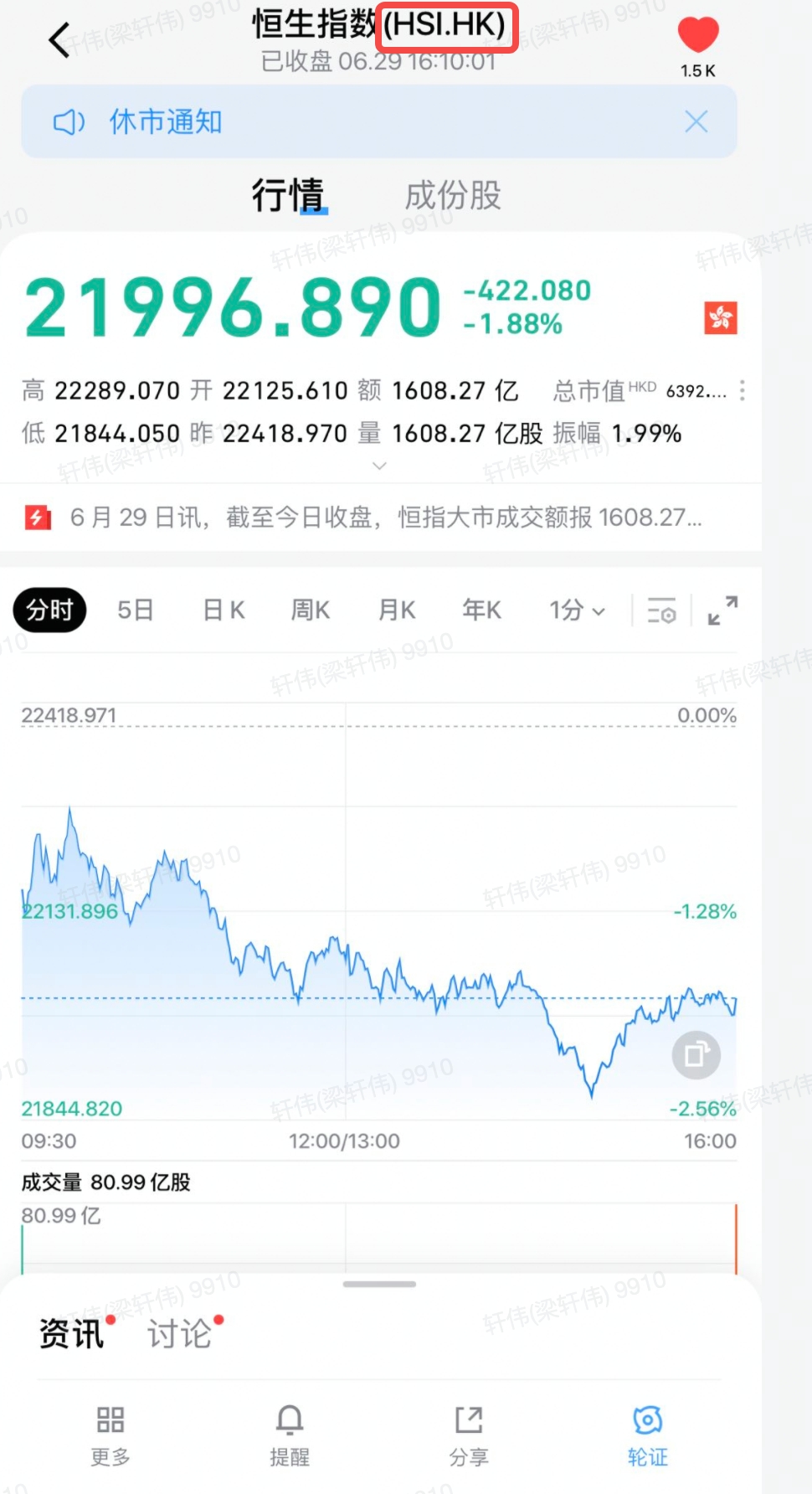 ## Q4: What is the quote authority of OpenAPI? How to buy quote cards?
A:
- Quote Authority
In accordance with the rules of the exchange, the authority of OpenAPI are independent, and are not shared with App, PC, or Web permissions. For example, the Hong Kong stock Level 2 authority you have on the App cannot be used on the OpenAPI side. LongPort also presents basic market rights to OpenAPI users. If you need a higher-level market, you can activate the high-level quote authority by purchasing a market card through on-line Quote Store of brokers or LongPort.
- How to buy quote cards
LongPort users can choose the market cards they want to buy through the "Quote Store" in the LongPort App.
## Q5: Quote Change By Date Time
A:
- US Market: 09:20:00 EDT/EST
- HK Market: 08:50:00 CST
- CN Market: 09:00:00 CST
- SG Market: 08:20:00 CST
## Q6: How to enable Overnight quote
A:
- The night market quotation needs to be actively enabled by filling in the key `need_over_night_quote`, value `true` in the `metadata` field of the authentication interface.
```protobuf
message AuthRequest {
string token = 1;
map
## Q4: What is the quote authority of OpenAPI? How to buy quote cards?
A:
- Quote Authority
In accordance with the rules of the exchange, the authority of OpenAPI are independent, and are not shared with App, PC, or Web permissions. For example, the Hong Kong stock Level 2 authority you have on the App cannot be used on the OpenAPI side. LongPort also presents basic market rights to OpenAPI users. If you need a higher-level market, you can activate the high-level quote authority by purchasing a market card through on-line Quote Store of brokers or LongPort.
- How to buy quote cards
LongPort users can choose the market cards they want to buy through the "Quote Store" in the LongPort App.
## Q5: Quote Change By Date Time
A:
- US Market: 09:20:00 EDT/EST
- HK Market: 08:50:00 CST
- CN Market: 09:00:00 CST
- SG Market: 08:20:00 CST
## Q6: How to enable Overnight quote
A:
- The night market quotation needs to be actively enabled by filling in the key `need_over_night_quote`, value `true` in the `metadata` field of the authentication interface.
```protobuf
message AuthRequest {
string token = 1;
map